

Cango Android App: installing on Android in plain words
Updated: 10 November 2026
Cango android app: steps in brief
Installing the mobile experience for your device is straightforward because the system uses a Progressive Web App (PWA). This means you do not need to download a heavy file from a store, saving storage space on your smartphone. The process relies on your browser functionality to pin the interface to your screen, making it accessible with a single tap, exactly like any other app on your handset. Since there is no actual APK file, you avoid manual updates, as the software refreshes itself whenever you open it.
| Action Step | Instruction | Tap Count |
|---|---|---|
| Open Browser | Navigate to the site in Chrome | 1 |
| Access Menu | Tap the three-dot icon in the corner | 1 |
| Install | Select ‘Install app’ or ‘Add to Home screen’ | 1 |
| Confirm | Tap ‘Install’ on the pop-up prompt | 1 |
This method is designed for Kiwi players who prefer quick access to pokies and live casino games without the clutter of traditional downloads. By pinning the site, you essentially create a shortcut that bypasses the browser address bar, giving you more screen real estate for your favourite games. Most users find the process takes less than ten seconds, and it is a reliable way to ensure you can reach your dashboard, check your balance, or start a new game session quickly. Please note that while all figures here are in AUD ($45 AUD minimum for the welcome bonus), your account will operate in AUD or EUR, as NZD is not available in the cashier.
Chrome shows this install sheet after you tap Install app. One more tap on Install and the icon lands on your home screen.
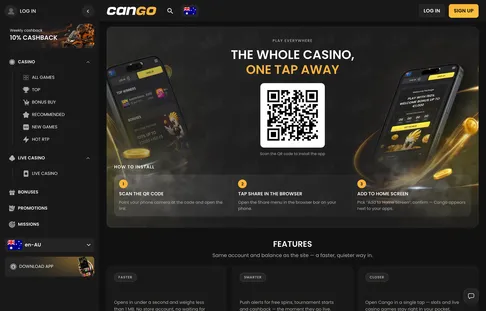
Cango android app: fixes
Sometimes the shortcut does not appear exactly as expected. If you encounter issues while setting up your cango android app, it is usually due to browser permissions or minor settings adjustments. First, ensure you are using a supported browser. While Google Chrome is the recommended choice for the best performance, Samsung Internet also supports the same install option. If the prompt does not appear, ensure that your browser has permission to add shortcuts to your home screen. This setting is typically found in your phone’s ‘Apps’ or ‘Special Access’ menu under the device settings.
If you are using a different browser, such as Firefox or Opera, the ‘Add to Home screen’ option might be labelled slightly differently. Look for ‘Page’ or ‘Share’ icons instead of the standard three-dot menu. If the icon fails to generate, check your storage space; if your home screen is completely full, the device may reject new icons. Removing an unused widget or app icon can create the necessary space. It is also a good habit to clear your browser cache if the page feels unresponsive or if the interface seems outdated. A simple refresh or clearing your temporary browser data often forces the PWA to re-initialise, showing you the most recent version of the lobby.
Remember, you never need to look for an APK file on third-party websites. If a site asks you to download an executable file, avoid it entirely, as Cango works strictly through the browser-based PWA method. If you are experiencing persistent trouble with the cango pwa chrome installation, you can always reach out to support. The live chat team is available 24/7 and usually replies within about 2 minutes to assist with technical setup queries.
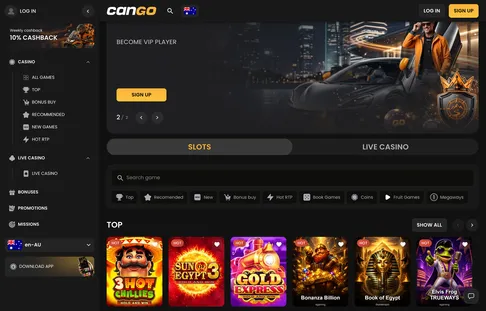
Launched from the icon, the home screen loads in its own window. You sign in once and the session stays put until you log out.
Cango android app: step by step
Setting up the interface is a process of turning a standard website visit into a persistent app experience. To begin, open the Google Chrome browser. Type the address of the casino into your browser. Once the main page loads, pause for a moment to let the assets settle; you will notice the lobby categories like Top, New, and Bonus Buy appearing. This is the moment to initiate the installation. Tap the three-dot menu icon located at the top right of your browser window. From the dropdown list, look for the option labeled ‘Install app’ or sometimes ‘Add to Home screen’.
Once you tap this, a system dialogue box will appear asking for confirmation. Click ‘Install’ or ‘Add’. Your phone will briefly process the command, and in about two seconds, a new icon will appear on your home screen, identifiable by the site’s logo. You can drag this icon into a folder or place it on your main screen for immediate access. Now, whenever you want to play, just tap that icon. It will open in its own window, hiding the browser bars and providing a cleaner view of the games. You can then follow our Cango login guide to enter your credentials securely. If you have not signed up yet, you can use the same icon to access the registration form. Use promo code WP1 if you are ready to claim the welcome offer of 150% up to $1,500 AUD plus 300 free spins.
After you have accessed your account, you will see your balance and personal mission dashboard. The PWA allows you to handle deposits via Visa, Mastercard, or crypto assets with the same security protocols as the desktop version. When it comes time to collect your winnings, the cashout process is handled through the same mobile interface. The minimum withdrawal is $30 AUD, and the casino processes these requests within 24 hours. Remember that the platform is built for speed, with most games loading in under five seconds on a standard 4G or 5G connection. Offers can change, so glance at the promo card before you opt in.
Cango android app: what players ask most
How do I install the Cango Android app on my phone?
Can Go Casino runs as a Progressive Web App, so you do not need to download an APK file or visit the Google Play Store. Open the casino in Chrome on your phone, tap the browser menu, and select Install app to add the Cango PWA Chrome shortcut to your home screen. This gives you instant access to over 3,000 games, including favourite pokies from BGaming and Thunderspin.
Can I claim the welcome bonus using the Cango app Android version?
Yes, mobile players can claim the 150% first deposit bonus up to $1,500 AUD plus 300 free spins by entering promo code WP1 at the cashier. You need a minimum deposit of $45 AUD to trigger the offer, which comes with a x30 wagering requirement typically completed within 7 days. The spins arrive in batches of 100 per day over 3 days on selected pokies like Bonanza Billion.
What payment methods and currencies work on the mobile app for New Zealand players?
New Zealand players manage their accounts in AUD or EUR since NZD is not in the cashier. You can deposit from a minimum of $15 AUD via Visa, Mastercard, or crypto options like BTC and USDT, though POLi is not part of the cashier. Withdrawals start at $30 AUD up to $8,000 AUD per week, with processing taking up to 24 hours after a pending window of up to 24 hours.
How do I verify my account and get support on the Cango Android app?
You can upload your ID and proof of address directly through your phone camera via the Sumsub system, which takes up to 48 hours to review. If you have questions while playing on mobile, 24/7 live chat is built into the screen and replies within about 2 minutes. You can also set personal deposit limits in your profile or contact Gambling Helpline NZ for support.