

Cango App: playing from your phone in plain words
Updated: 10 November 2026
Cango casino app: the install overview
Kiwi players who prefer spinning pokies with one thumb do not need to clear gigabytes of phone storage to play at Can Go Casino. The Cango casino app runs as a Progressive Web App, or PWA, which installs directly from your mobile browser onto your home screen in seconds. Because NZD is not available in the cashier, your account runs in AUD or EUR, and all figures in this guide are shown as $ AUD. Once the shortcut sits alongside your everyday icons, launching games like 3 Hot Chillies or managing a quick cashout takes no more than three taps.
| Device / Method | Install Steps (Tap Count: 3) | What You Need |
|---|---|---|
| iPhone (Safari) | 1. Tap the Share icon at the bottom. 2. Scroll and tap Add to Home Screen. 3. Tap Add in the top corner. | iOS device, Safari browser, active internet connection |
| Android (Chrome) | 1. Tap the three-dot menu in the top corner. 2. Tap Install app or Add to Home screen. 3. Tap Install to confirm. | Android smartphone or tablet, Chrome browser, about 2 MB of free space |
| QR Code from Desktop | 1. Open your phone camera and point it at the screen QR code. 2. Tap the browser pop-up link. 3. Tap the browser menu to pin the icon. | Computer screen displaying the lobby, smartphone with a working camera |
Cango app: Chrome install steps
Android users across New Zealand mostly rely on Google Chrome for everyday browsing, making it the fastest tool for setting up the Cango app on a Samsung, Pixel, or Oppo handset. Chrome recognises the casino’s web manifest automatically and builds a native-style package right on your device without asking you to adjust security permissions or allow installs from outside the store.
- Open Google Chrome on your Android phone and load the Can Go Casino mobile homepage using a stable Wi-Fi or 4G connection.
- Locate the browser menu icon, represented by three vertical dots in the upper-right corner of your screen, and give it a single tap.
- Look down the drop-down list and tap the line that reads Install app (on some older Android versions, this line reads Add to Home screen).
- A small confirmation card will slide up from the bottom of the display showing the Cango icon; tap the blue Install button to approve.
- Wait about three seconds while Chrome compiles the shortcut, then swipe back to your main phone screen to find the new icon ready for one-handed play.
This is the install prompt the browser shows once the PWA is ready. Confirm it and the canGO icon appears on your home screen next to your other apps.
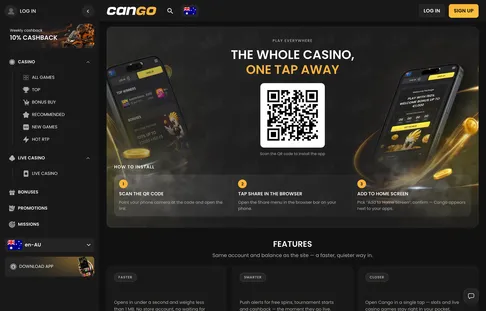
Cango mobile: Tap Count
Everything we test at Cango Mobile NZ is measured by how easily you can do it while holding a flat white in your other hand. Our signature Tap Count metric tracks the exact number of screen presses required to complete everyday tasks inside the Cango mobile interface, starting from the moment you wake up your phone or land in the main lobby. Apple users who want device-specific screen layouts can also read our guide to the Cango iPhone app for extra Safari tips.
- Install the web app on your phone (Tap Count: 3). Open the browser menu with tap one, select the home screen installation option with tap two, and confirm the prompt with tap three.
- Sign in to your player profile (Tap Count: 2). Tap the Cango icon on your home screen, then tap the Google sign-in button or use your phone’s saved biometric autofill to enter the lobby immediately.
- Make a top-up deposit (Tap Count: 3). Tap the Cashier button at the bottom of the screen, tap your saved Visa, Mastercard, or crypto method, and tap Confirm to send at least $15 AUD into your balance.
- Claim the welcome bonus (Tap Count: 3). Open the deposit screen with tap one, tap the promo code field to type WP1 with tap two, and tap Deposit with $45 AUD or more on tap three.
- Launch 24/7 live chat support (Tap Count: 1). Tap the floating speech bubble icon anchored in the bottom corner of the screen to connect with an agent who usually replies within about 2 minutes.
- Open a favourite pokie (Tap Count: 2). Tap a lobby category pill like Hot RTP or Bonus Buy, then tap the game tile for Elvis Frog TRUEWAYS or Sun of Egypt 3 to start spinning.
- Request a cashout (Tap Count: 3). Tap your account wallet icon, tap the Withdrawal tab to pick Visa OCT, Mastercard Payment Transfer, or your crypto wallet, and tap Submit for any amount from $30 AUD up to $8,000 AUD per week.
Opened from the icon, the lobby runs full screen with no address bar. Promotions, the cashier and the chat sit in the same places as in the browser.
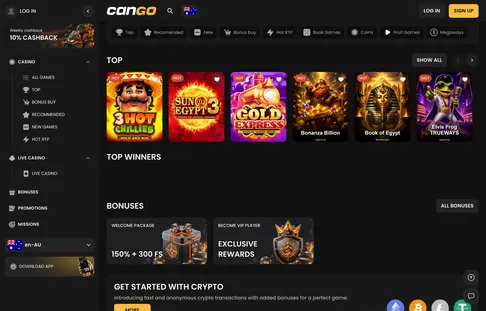
Cango download: no App Store, no Google Play
When you look for a Cango download, do not waste time typing the brand name into the Apple App Store or Google Play Store. Can Go Casino skips traditional app stores completely and delivers its software as a browser-based Progressive Web App. If you search the public stores, you will only stumble across unrelated social games or knock-off utilities that have nothing to do with real-money pokies.
Skipping the stores gives Kiwi players several practical advantages on mobile hardware. A typical native casino app from an app store weighs between 80 MB and 250 MB, and it forces you to download bulky patches every second week. The Cango PWA uses less than 2 MB of local cache storage because the heavy graphics for pokies like Gold Express and Fruit Million stream directly from the game servers as you play. Even better, the software updates itself silently in the background. Every time you tap the home screen icon, your phone fetches the newest lobby layout, the latest New and Megaways releases, and current promotional cards without interrupting your session.
If you happen to be sitting at a laptop or desktop computer, getting the Cango download onto your phone is even simpler thanks to the built-in QR code generator. Open the casino site on your computer screen, point your phone camera at the QR square displayed in the mobile section, and tap the link that pops up on your viewfinder. Your mobile browser will open the exact page immediately, allowing you to pin the icon to your home screen in three quick taps without typing a single letter into an address bar.
Cango casino app: what you can do from the icon
Launching the Cango casino app from your home screen gives you the full power of the desktop site inside a compact, thumb-friendly frame. Our team rates the game selection at 4.0 out of 5 and the bonus structure at 4.3 out of 5, and every single feature is accessible right from the main icon.
- Browse the lobby. Swipe the category bar for Top, New, Bonus Buy, Hot RTP, Megaways or Live Casino, or open a collection such as Egypt or Mythology. Tap Count: 1 to filter, 1 more to open a game.
- Pay in and cash out. The cashier takes Visa, Mastercard, alternative methods and crypto from $15 AUD, and cashouts start at $30 AUD with a cap of $8,000 AUD a week. Requests are processed within 24 hours, after a pending window of up to 24 hours.
- Claim the offers. Code WP1 on a first deposit of $45 AUD or more gives 150% up to $1,500 AUD plus 300 free spins, spread over three days. The Sunday reload (50% up to $150 AUD) and the 10% weekly cashback sit on the same promotions tab.
- Run Missions. Daily and weekly tasks open after login and usually pay out spins or bonus money. The VIP Club sits one tap further: a confirmed phone on the account plus a qualifying deposit, typically about $1,000 AUD in a month.
- Chat with support. The bubble in the corner opens 24/7 live chat, with replies in about 2 minutes. Verification uploads, deposit limits, time-outs and self-exclusion are all handled from the same profile menu.
Cango app: still unsure?
How do I complete a Cango download on my iPhone or Android device?
The Cango app works as a web application rather than a store file, so you install it directly from your mobile browser. On an iPhone, open Safari, tap the Share button, and select Add to Home Screen to place the icon on your phone. Android users can tap the browser menu and select Install app to get one-tap access to over 3,000 pokies and live games.
Can I claim the welcome bonus on the Cango casino app?
Yes, registering and depositing through Cango mobile gives you the exact same promotions as the desktop site. Enter promo code WP1 with a minimum deposit of $45 AUD to claim 150% up to $1,500 AUD and 300 free spins across three days on pokies like Bonanza Billion. The bonus carries a x30 wagering requirement that usually must be completed within 7 days.
What payment methods and currencies are available on Cango mobile for Kiwis?
New Zealand accounts operate in AUD or EUR because NZD is not in the cashier, and your bank may apply a small conversion fee. You can fund your account from your phone using Visa, Mastercard, or crypto like BTC and USDT starting from $15 AUD. Mobile payouts start at $30 AUD with weekly limits up to $8,000 AUD, and requests are processed within 24 hours after a pending window of up to 24 hours.
How do I verify my account and get support on the mobile app?
You can complete the Sumsub verification directly on your smartphone by uploading a photo ID, a recent proof of address under 90 days old, and taking a quick live selfie. Approval takes up to 48 hours, and you can also verify your phone number in your profile to help qualify for the VIP programme. If you get stuck, the 24/7 live chat icon sits right on your mobile screen and connects you to an agent in about 2 minutes.